Loops
Learn how to repeat a block of JavaScript code multiple times using loops.
What is a Loop?
A loop is used when we need to execute the same block of code repeatedly.
Instead of writing the same statements many times, we can use a loop and control how many times the code should execute.
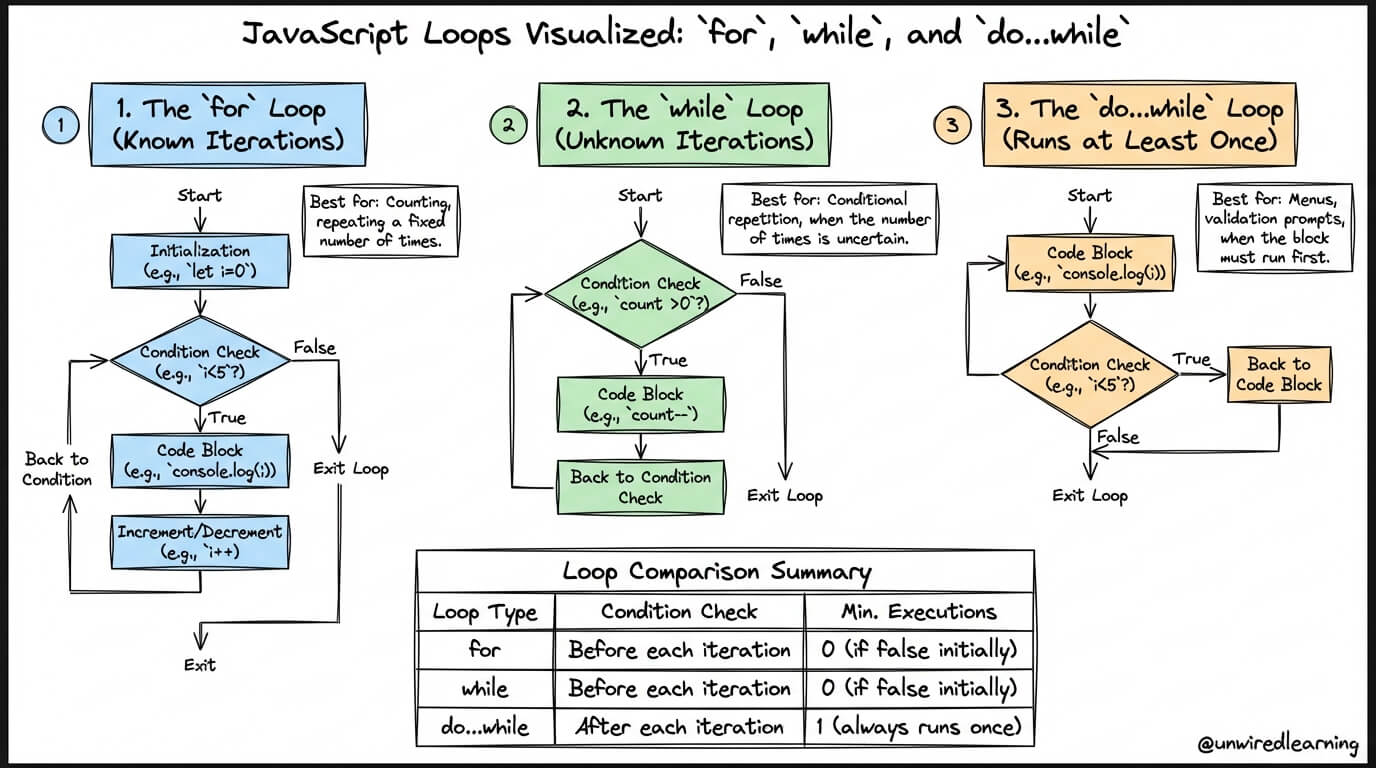
Common JavaScript loop structures and their execution flow.
Common JavaScript Loops
for Loop
Commonly used when the number of iterations is known or controlled with a counter.
while Loop
Repeats code while a specified condition remains true.
do...while Loop
Executes the loop body first and checks the condition afterward.
for Loop Syntax
for (initialization; condition; update) {
    // code to execute
}
How a Loop Works
Example 1: for Loop
Here, the loop starts from 1 and runs until the counter reaches 5.
for (let i = 1; i <= 5; i++) {
    console.log("Number:", i);
}Output
Number: 2
Number: 3
Number: 4
Number: 5
Example 2: while Loop
A while loop checks its condition before each iteration. The loop continues while the condition is true.
let count = 1;

while (count <= 5) {
    console.log("Count:", count);
    count++;
}Output
Count: 2
Count: 3
Count: 4
Count: 5
Important Note
Avoid Infinite Loops
Make sure the loop condition can eventually become false.
In a counter-based loop, update the counter correctly so that the loop can stop.
Summary
Loops are used to repeat code efficiently. The main JavaScript loops are for, while, and do...while. A for loop is useful for controlled repetition, a while loop checks its condition before each iteration, and a do...while loop checks the condition after executing the loop body.