Comparison & Logical Operators
Learn how to compare values and combine conditions using comparison and logical operators in JavaScript.
What are Comparison Operators?
Comparison operators compare two values and produce a Boolean result: true or false.
They are commonly used when a program needs to make a decision based on two values.
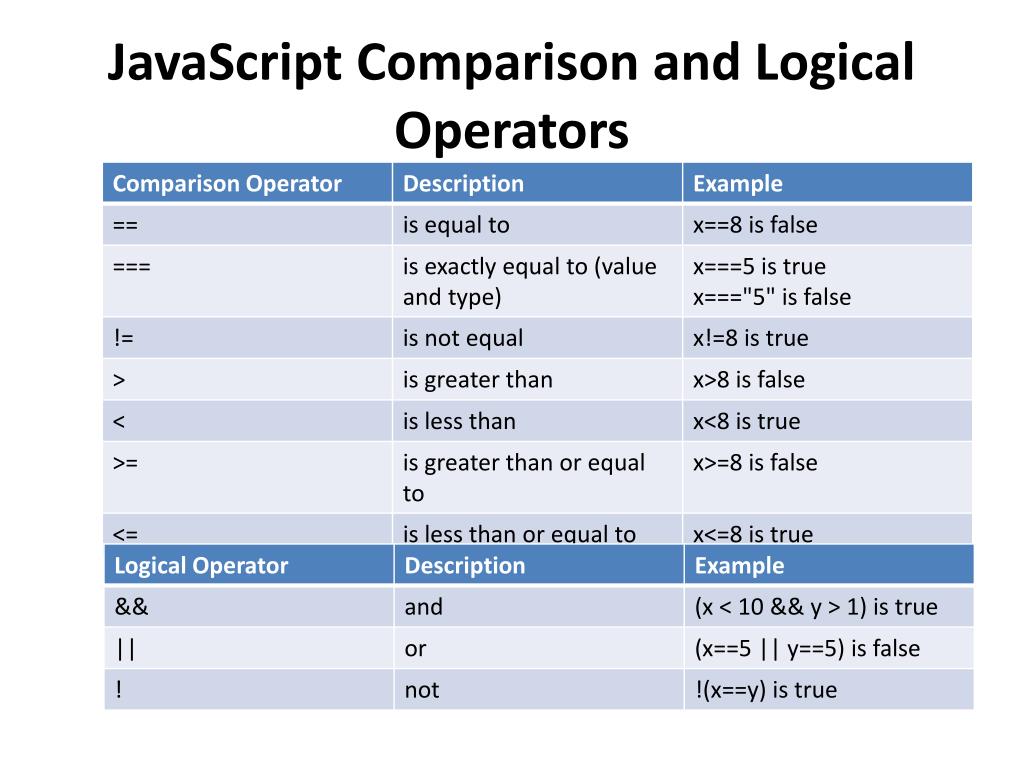
JavaScript comparison and logical operator reference.
Comparison Operators
Equal
Checks whether two values are equal after type conversion when necessary.
Strict Equal
Checks whether both value and type are equal.
Not Equal
Checks whether two values are not equal.
Strict Not Equal
Checks whether value or type is different.
Greater Than
Checks whether the left value is greater.
Less Than
Checks whether the left value is smaller.
Logical Operators
Logical AND
Returns true when both conditions are true.
Logical OR
Returns true when at least one condition is true.
Logical NOT
Reverses a Boolean result.
How Comparison and Logical Operators Work
Example 1: Comparison Operators
Comparison operators can be used to check marks, age, price, quantity, or any other values.
const marks = 78;
const requiredMarks = 40;
const enteredMarks = "78";

console.log("Marks Passed:", marks >= requiredMarks);
console.log("Marks Equal:", marks == enteredMarks);
console.log("Strict Equal:", marks === enteredMarks);
console.log("Marks Greater Than 90:", marks > 90);
console.log("Not Equal to 50:", marks != 50);Output
Marks Equal: true
Strict Equal: false
Marks Greater Than 90: false
Not Equal to 50: true
Example 2: Logical Operators
Logical operators help us combine multiple conditions into a single expression.
const marks = 82;
const attendance = 88;

const marksPassed = marks >= 40;
const attendancePassed = attendance >= 75;

const eligible = marksPassed && attendancePassed;
const specialCase = marksPassed || attendance > 90;

console.log("Marks Passed:", marksPassed);
console.log("Attendance Passed:", attendancePassed);
console.log("Eligible:", eligible);
console.log("Special Case:", specialCase);
console.log("Not Eligible:", !eligible);Output
Attendance Passed: true
Eligible: true
Special Case: true
Not Eligible: false
Important Note
== vs ===
== compares values and may perform type conversion.
=== performs a strict comparison, so both value and type must match.
Summary
Comparison operators compare values and return Boolean results. Common comparison operators include ==, ===, !=, !==, > and <. Logical operators such as &&, || and ! are used to combine or reverse conditions.