DOM Introduction
The Document Object Model (DOM) represents an HTML document as a tree of objects. JavaScript can use the DOM to access, read, and modify elements on a web page.
What is the DOM?
DOM stands for Document Object Model. It is a browser-provided programming interface that represents the structure of a web page as objects and nodes.
When the browser loads an HTML document, it creates a DOM tree in memory. JavaScript can then interact with this tree to access elements and change the page structure, content, and styles.
Simple Definition
HTML creates the structure, CSS controls the appearance, and JavaScript + DOM can interact with and dynamically change the page.
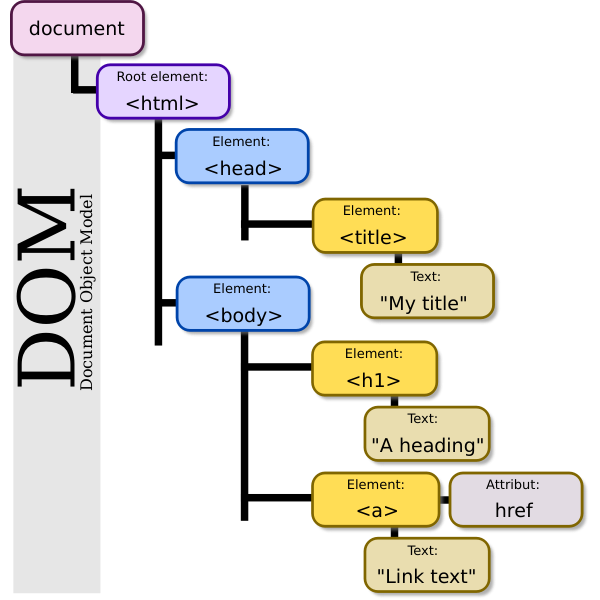
The DOM represents an HTML document as a hierarchical tree of nodes.
Important Parts of the DOM
Document
Represents the complete web page loaded in the browser.
Element
Represents HTML elements such as
<h1>,
<p>, and
<div>.
Node
A general item in the DOM tree. Elements and text are examples of DOM nodes.
DOM Tree Structure
The DOM is organized like a tree. A node can have a parent, children, and siblings. The complete document starts from the root document node.
JavaScript and the DOM
JavaScript itself is a programming language. The DOM is a Web API provided by the browser. JavaScript can use DOM APIs to work with the current web page.
Basic Relationship
JavaScript → uses DOM APIs → accesses HTML elements → reads or changes the page.
Example 1: Access the Document
The document object represents the
current HTML document.
console.log(document);
console.log(document.title);The browser's document object and the current page title are displayed.
Example 2: Read Document Information
JavaScript can read information from the
document object.
console.log("Title:", document.title);
console.log("URL:", document.URL);Title: current page title
URL: current page URL
Example 3: Access the Body
The document.body property gives
access to the <body> element
of the current document.
console.log(document.body);
console.log(document.body.tagName);The body element is displayed.
BODY
Example 4: Change the Page Title
JavaScript can also modify properties of the
document. For example, the page title can be
changed using document.title.
document.title = "CIIT JavaScript Course";

console.log(document.title);CIIT JavaScript Course
Why is the DOM Important?
The DOM allows JavaScript to interact with the page after it has been loaded. Using DOM APIs, JavaScript can access elements, change content, modify styles, create elements, remove elements, and respond to user interactions.
What You Will Learn Next
In the upcoming DOM topics, you will learn how to select elements, change their content, modify styles, and create new HTML elements using JavaScript.
Summary
The DOM stands for Document Object Model.
It represents an HTML document as a tree of
objects and nodes. The browser creates this
representation when it loads the page.
JavaScript can use the DOM API through objects
such as document to access and
manipulate the web page.