Changing Content
JavaScript can dynamically change the text or HTML content inside an element using DOM properties such as textContent and innerHTML.
What is Changing Content?
Changing content means updating the information displayed inside an HTML element after the page has already loaded.
JavaScript first selects an element and then changes the content of that element using DOM properties.
Simple Definition
Select the element → Access its content → Change the content.
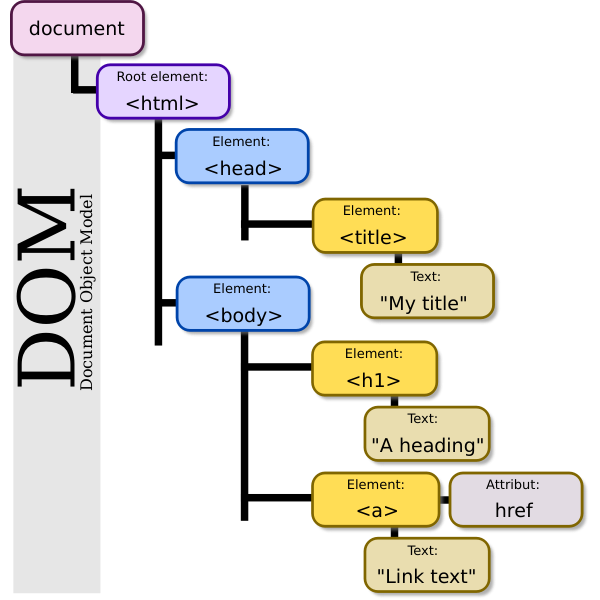
JavaScript uses the DOM to access and manipulate elements of an HTML document.
How Changing Content Works
The basic process is to select an HTML element and update the content stored inside that element.
Common Ways to Change Content
textContent
Changes or reads the plain text content of an element.
innerHTML
Changes or reads HTML markup inside an element.
innerText
Works with the visible text rendered inside an element.
Example 1: Change Text Using textContent
The textContent property can be used to replace the text inside an element.
const message = "Welcome to CIIT Training Institute";

console.log("Before:", "Hello Student");

console.log("After:", message);Before: Hello Student
After: Welcome to CIIT Training Institute
Example 2: Change Content Using innerHTML
The innerHTML property allows JavaScript to insert HTML markup inside an element.
const content = "<strong>Welcome to CIIT JavaScript Course!</strong>";

console.log(content);Welcome to CIIT JavaScript Course!
Example 3: Updating a Paragraph
JavaScript can also update the content of a paragraph dynamically.
let courseMessage = "Learn JavaScript with CIIT";

console.log("Original:", "Start Learning");

courseMessage = "Learn JavaScript with CIIT";

console.log("Updated:", courseMessage);Original: Start Learning
Updated: Learn JavaScript with CIIT
Example 4: Changing Multiple Values
JavaScript can update multiple values and display the new content.
let studentName = "Aarav";
let course = "JavaScript";

studentName = "Riya";
course = "Full Stack Development";

console.log("Student:", studentName);
console.log("Course:", course);Student: Riya
Course: Full Stack Development
textContent vs innerHTML
Important Difference
textContent treats the assigned
value as plain text.
innerHTML treats the assigned
value as HTML markup.
When working with untrusted user input,
prefer textContent rather than
directly inserting that input through
innerHTML.
Real-World Example
A training website can dynamically update course information, student messages, notifications, or status text using DOM content properties.
let courseStatus = "JavaScript Course Available";

console.log("Course Status:", courseStatus);

courseStatus = "JavaScript Course Started";

console.log("Updated Status:", courseStatus);Course Status: JavaScript Course Available
Updated Status: JavaScript Course Started
Important Points
• Select the element before changing its content.
• Use textContent for plain text.
• Use innerHTML when HTML markup is intentionally required.
• Changing content updates the DOM and can change what the user sees on the page.
• Be careful when inserting untrusted data with innerHTML.
Summary
JavaScript can change the content of HTML elements through the DOM. The most common properties are textContent, innerHTML, and innerText. Selecting the correct element and updating its content allows web pages to become dynamic and interactive.